Need help in using our WordPress theme?

Categories are meant for broad grouping of your posts, think of these as general topics. Categories are hierarchical, so you can add sub-categories. Sub-categories are made when a Category is added to a Parent Category.
Adding categories to a blog would make it easier to locate and post on similar topics by category.
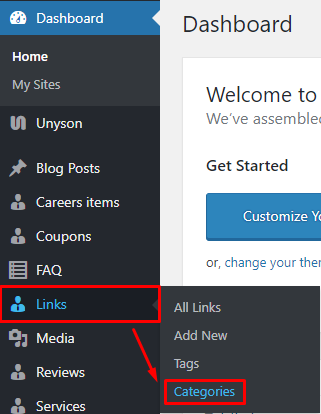
To create new Links Categories, navigate in WordPress Dashboard to Links > Categories.
|
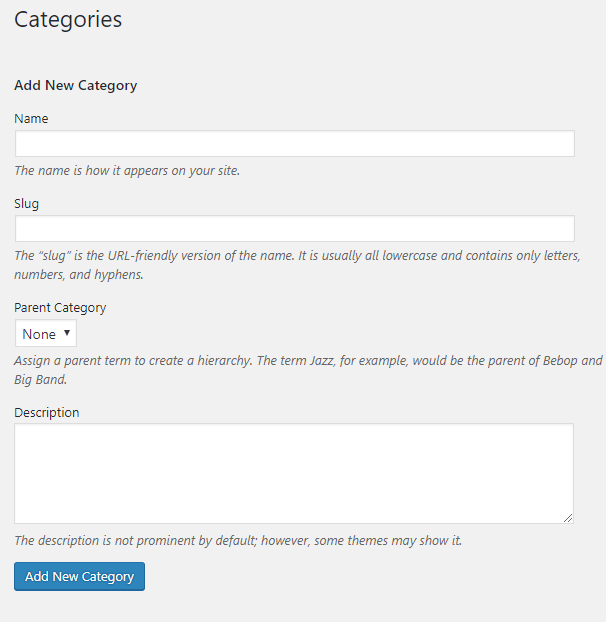
The Categories page will show, here you can add the details of the Links Categories that you would like to create.
|
After adding all the details, click on Add New category to save.
To delete a Category, navigate your Dashboard to Links > Categories.
In the Categories page, you will see all the created category.
To delete a category, you have two options:
Single Delete - Hover your mouse pointer on the category that you would like to delete. You will see a Delete option pop-up. Click on Delete to delete.
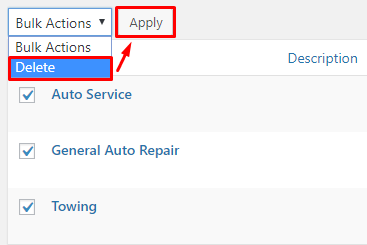
Multiple Delete - To delete multiple categories, click on the box beside the categories you would want to delete. Then click on the drop-down box for Bulk Actions and choose the Delete option. Click on Apply button to delete.